Digital EV Doctor (Tesla alert clear)
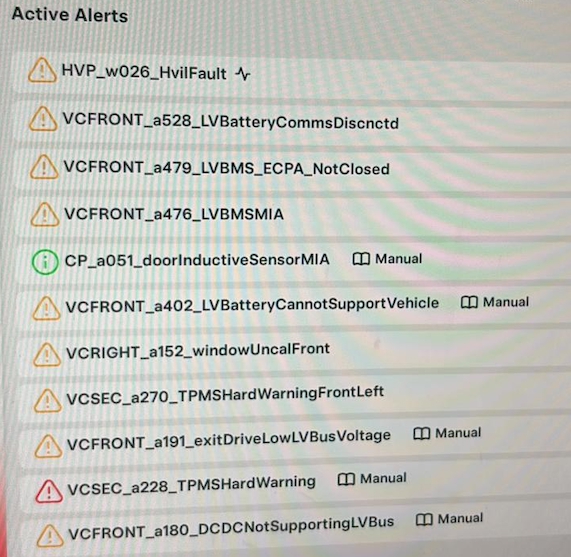
VCFRONT_a402_LVBatteryCannotSupportVehicle alert clear Tesla
VCFRONT_a402_LVBatteryCannotSupportVehicle alert clear Tesla
No se pudo cargar la disponibilidad de retiro
Tesla Alert Clear: Remote Diagnosis and Assistance to clear alert
Clear Tesla Alerts from the comfort of your home.
Are you receiving an alert on your Tesla touchscreen? We are here to help you clear it - quickly, easily, affordably and sustainable.
We provide remote diagnosis and support to clear Tesla alerts, often without the need to visit a Service Center (Workshop), which can save you both time and money.
What's Included in our service
- Remote diagnosis
- Guidance to diagnose the alert via Service Mode
- Explanation of possible causes
- Step-by-step instructions, information, and support to clear the alert
- Answers to any technical or functional questions you may have
Common Alert Codes
- VCFRONT_a402_LVBatteryCannotSupportVehicle
- Here are some of the most common alert codes
- Electrical system backup power is unavailable
- Vehicle will consume more energy while idle
- The vehicle controller has detected a condition where the low voltage (LV) battery is unable to support vehicle electrical systems. The vehicle is likely to shut down if high voltage (HV) battery support for vehicle electrical systems via the power conversion system (PCS) is lost, so the HV system will remain energized to continue supplying electrical power to the vehicle until the alert clears.
- The LV battery is unable to support vehicle electrical systems. The high voltage (HV) system will remain energized to continue supplying electrical power to the vehicle while the LV battery is unavailable. This may result in greater range loss than expected, increased HV system energy consumption when the vehicle is idle, and prevent the vehicle from sleeping.
-------------------------------------------------------------------------------
Next Steps After Purchase
Once you’ve purchased this product/service, please contact us directly for assistance.
Contact Methods
For quick and interactive support, please contact us Whats App
Please Include the Following Information
- Car Identification Number (VIN) number
-
Email ID linked to Tesla account (Car Owner E-Mail ID)
- Car Model, Year, Mileage
- Photos or video of the alerts from service mode with alert details
- When and how did the alert appeared
- Any recent repair, if yes, please describe
-
Description of the issue
Languages we speak
We currently provide support in:
- English
- German
Service Fee Information
Included in the Basic Service Fee
- Remote diagnosis
- Remote support
Not included:
- If hardware repair is required, additional costs will apply.
- If the issue is hardware-related, the alert may not be clear remotely. However, we can help to arrange an appointment with one of our partners, if possible.
Note: Additional charges may apply, if further support is needed. We charge 100 Euro per hour.
Location and On-Site Support
We are based in Germany and offer on-site support, If needed. Please note, on-site will incur additional charges.
We have also workshop partners around the globe.
Questions?
If you have any questions, feel free to reach out to us via Whats App at +49(0)15226242038
Share